
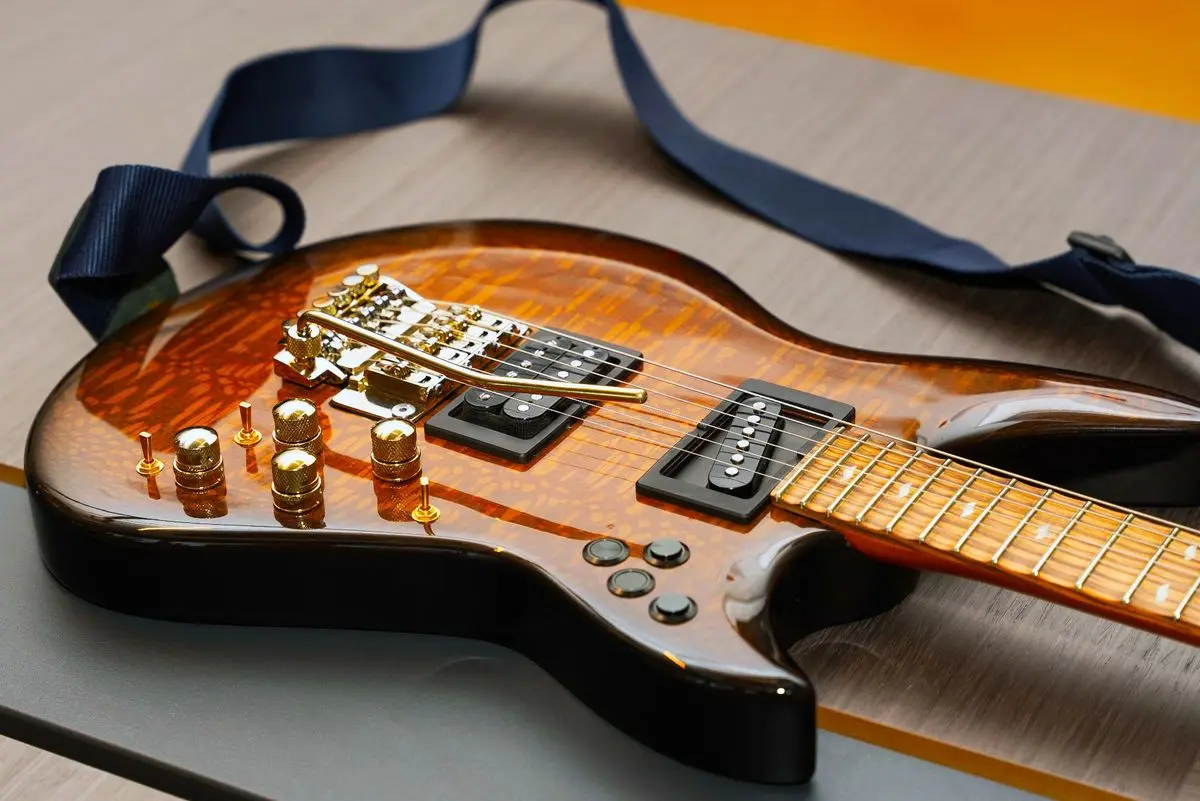
How to Maintain & Preserve Your Shark Guitar
HOW-TO & GUIDES
A Shark guitar is built to be lived with. Most of what keeps it in top shape is simple, takes a soft cloth and a couple of minutes, and needs no tools at all. The few jobs that go deeper, string changes, neck swaps, a battery once in a while, are designed to be things you do yourself, at your kitchen table, without a trip to a shop.
This is the one place that pulls all of it together: the quick habits that protect your instrument day to day, the occasional jobs that keep it playing its best, and where to find the full step-by-step guide for each. Think of it less as a chore list and more as how to get years of easy ownership out of one guitar.
A Simple Rhythm
You do not need a schedule taped inside your case. Three natural moments cover almost everything.
Every time you finish playing. Give the strings, the neck, and the hardware a quick wipe with a soft, dry cloth. Sweat is mildly acidic, and the last thing that touches your strings each session should be that cloth, not your hands. This one habit does more for string life and hardware shine than anything else on this page.
Around every string change. With the strings off or slack is the natural time to clean the fretboard, check that the hardware is seated the way it should be, and, if it has been a while, think about the battery. Nothing here is urgent. It is just the convenient window when everything is already accessible.
When the weather turns. Wood responds to the room it lives in. A change of season, or moving the guitar between very different environments, is the moment to think about where it is stored. More on that below.
That is the whole rhythm. Everything else in this guide fits into one of those three moments.
Cleaning, Done Right
The universal part first, true for any electric guitar in any brand's catalog:
A soft microfiber cloth is your main tool. Dry for a quick wipe, very slightly damp for more.
When you reach for a product, use one made for guitars. Fretboard conditioners, string cleaners, body polishes formulated for instrument finishes. You rarely need more than the cloth.
Wipe down after playing. It is worth repeating because it is the habit that matters most.
Now the part that belongs only to your Shark: the titanium hardware. Your bridge, your nut, the titanium frets, and the visible frames around the pickups all carry their color through anodizing, and that is worth pausing on, because it changes how you look after them. The color is not paint laid on top and not a coating that can wear through. It is grown into the surface of the titanium as an oxide layer, which is exactly why it survives years of playing without chipping, peeling, or fading.
So the titanium asks very little of you. The few real cautions are all about not disturbing that surface layer where the color lives:
Polishes and abrasives are the ones to avoid. A metal polish or a scouring pad works by taking off a microscopic top layer, and on anodized titanium that layer is where the color is. Ultrasonic cleaners fall in the same group.
Leave the oil and solvent sprays in the drawer. WD-40 and anything like it, and fragrance or cologne mist too, have nothing useful to do on the metal; it needs neither lubricant nor protectant.
Strong chemicals never touch any hardware: no bleach, no aggressive household cleaners, no rust removers.
What it does want is simply a cloth, dry or barely damp. If something sticky has built up, a little mild soapy water on the cloth lifts it and you dry it after. That really is the whole of it.
Where It Lives: Humidity, Temperature, Storage
Preserving a guitar over the long run is mostly about the room it sits in. The metal on your Shark is close to indifferent to normal conditions. The wood is the part that has opinions.
Wood likes stability more than any particular number. It does not enjoy hot cars, radiators, direct sun through a window, or being carried straight from a cold trunk into a warm room. Slow and steady is what keeps a neck straight and a finish sound over years.
A useful reference: the climate-controlled rooms where we keep our tonewood sit at roughly 45 to 50 percent relative humidity and around 20°C. You do not need lab conditions at home. A living space anywhere in that general neighborhood, without wild swings, is a comfortable home for any guitar.
For day-to-day storage, a case or a stand out of direct sun and away from heat sources is plenty. If you are putting the guitar away for a long stretch, or packing it down to travel, its Maintenance Mode is built exactly for that: it takes the tension off the strings without removing them, so the instrument can rest, or fold down compact, and come right back. There is a short walkthrough of Maintenance Mode in the everyday procedures just below.
The Everyday Procedures
These are the jobs you will actually do as an owner. Here is the short version of each. Every one of these also has its own full step-by-step guide on the blog when you want the detailed walkthrough.
Tuning. Shark's tuning is self-locking, so once you are at pitch you tend to hold it. New strings are the exception: they drift while they stretch, which is string physics, not a fault. A few tuning passes settle them in.
Changing strings. Shark anchors each string with a set screw at both the bridge and the nut, so there are no ball ends to seat and no windings around a post. Two things are worth remembering: tighten the set screws firmly but never hard enough to crush the string, and pre-tension the thin B and high E from the headstock side before you lock them, which makes tuning up much easier. You do this with the No. 3 hex key that comes with your guitar.
Changing necks. This takes about 30 seconds and no tools. You put the bridge in Maintenance Mode to slack the strings, lift off the nut's string carrier with the strings still attached to it, release the neck at its titanium latch, and click the new one home. One rule governs the whole thing: match the fret count. A 22-fret neck goes on a 22-fret body, a 24 on a 24. Everything else in the Shark system interchanges freely.
Switching fixed and tremolo mode. The bridge converts between a floating tremolo and a locked, fixed bridge with a slide bolt, no tools, in seconds. Pick fixed for maximum stability and sustain, tremolo for expressive pitch control.
Maintenance Mode. This is the third bridge position, a service setting rather than a playing mode. It locks the tremolo forward so the strings go completely slack while staying attached at both ends, which is what makes tool-free neck changes, string changes, and travel packing possible.
Dialing It In
Beyond the basics, a Shark gives you the kind of fine adjustments that usually mean a visit to a tech. You are welcome to leave every one of these at the factory setting and simply play. When you want to tune the feel to your hands, here is what is in reach.
Pickup height. Every Shark Pickup Module carries its own height mechanism: two spring-loaded height screws on the back of the module, adjusted with the same No. 3 hex key. Because the mechanism is on the module, your setting travels with the pickup, so a module comes back at the height you gave it even after a swap. Work in quarter turns and re-check by ear. One caution: do not back a height screw out past its travel, or it can come free of the module.
Spring tension. The bridge springs balance against your string tension, so a move to a heavier or lighter string gauge means the springs should be reset to match. Adjusting them means taking the bridge off.
Action, intonation, and tremolo height. String height, intonation, and the resting height of the bridge are all adjustable on the instrument. If you are comfortable setting these up, the hardware invites it; if you are not, the factory setup is a fine place to stay.
Electronics and the Battery
The electronics side asks almost nothing of you, because it is built to look after itself.
A single 9V battery powers everything on board: the Electronics Module, any FX cards, and active pickups if you run them. You cannot drain it by forgetting to switch the guitar off, because there is no off switch to forget. A motion sensor watches for activity, puts the electronics to sleep when the guitar has rested still for a while, and wakes them the instant you pick it up.
How long a battery lasts depends on what you have installed. Analog FX cards sip power; digital FX cards and active pickups draw noticeably more, so a loaded Supreme will go through batteries faster than a simple setup. If you would rather change batteries less often, a rechargeable Li-ion option is available and lasts considerably longer than a standard 9V.
Knowing it is time, and swapping it. When the battery runs low, the Electronics Module simply stops responding: the FX cards will not switch and the onboard controls go quiet. The guitar itself keeps playing, falling back to passive operation like a standard electric, so a dead battery mid-set is an inconvenience, not a silence. The one exception is active pickups, which need power to make any sound at all, so if you run actives, keep a spare 9V in your bag. Replacing it takes no tools: the battery sits in its own bay on the back of the guitar, in the Electronics Module area, behind a small cover held shut by a red retainer. A gentle press frees the retainer, the cover opens, the battery lifts out and the fresh one seats back in the same way, and you close it up in reverse.
What the pickup modules accept. Passive pickups of any kind drop straight in. Actives are welcome too, running off the same 9V. What the modules cannot take right now are sustainer systems and piezo bridges, which depend on controls the electronics are not built for yet. When a particular pickup leaves you unsure, ask us while it is still a question, not once it is already in your hands.
The Few Places That Ask for a Careful Hand
Almost everything on a Shark forgives you. A short list does deserve your attention, and it all comes down to two ideas.
Respect Maintenance Mode. Enter it from tremolo mode, never from a locked fixed bridge. Coming back out is the one moment to slow down: the lock frees as the arm rises toward the pickups, not as it drops toward playing position, so lift the arm to unload the lock and then ease it down. Do not pop the lock while the arm is loose, or all that stored tension will slam the bridge back and can wreck your strings and setup.
Let the clicks do the work, and never force anything. The neck latch and the string carrier each seat with a clear click, and that click is your confirmation. When a part will not seat, the fix is always to check the alignment, not to push harder. And Shark necks belong only on Shark bodies, because that joint is a machined titanium interface held to very tight tolerances rather than a generic neck pocket.
The Paperwork That Protects You
Three small things stand behind years of easy ownership:
1.Register in your first month. Adding the guitar to your account at sharkguitars.com within 30 days of purchase turns the standard two-year warranty into three. It is a few minutes well spent, ideally the week it arrives.
2.Ask us before you change anything. Warranty coverage is for manufacturing defects, not for wear and not for modifications we did not authorize. Because the platform is unusually accommodating, a quick message to us before you start, by email or through the live chat on our site, often turns up a supported route to what you were about to improvise.
3.Flag shipping damage at the door. If a box turns up visibly knocked about, have the courier record the damage on the spot and tell us the same day. That on-delivery record is what keeps a claim clean.
The Short Version
Wipe it down when you finish. Keep it in a steady room, out of heat and damp. Do your string and neck changes in Maintenance Mode, and stay in control of the arm on the way back out. Keep fret counts matched, trust the click, and check alignment instead of forcing a part. Give the titanium nothing but a soft cloth. Carry a spare 9V if your pickups are active. And register inside 30 days.
Do those, and the rest is just playing. That is the whole point of the instrument: the engineering carries the worry so you do not have to. If a question ever comes up that this guide does not answer, reach us by email or through the live chat on our website. We would rather hear from you early than late.
Date Edited: 21-07-2026
Date Created: 21-07-2026
TAGSHow-To, Maintenance